


Page 180 - Customize-Project-Plan-by-tailoring-Smartsheet
P. 180
Customize your Project Plan
by tailoring Smartsheet
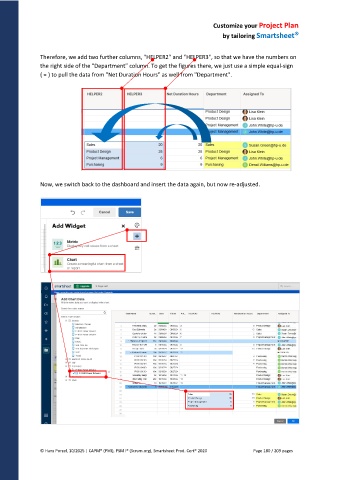
Therefore, we add two further columns, "HELPER2" and "HELPER3", so that we have the numbers on
the right side of the "Department" column. To get the figures there, we just use a simple equal-sign
( = ) to pull the data from "Net Duration Hours" as well from "Department".
Now, we switch back to the dashboard and insert the data again, but now re-adjusted.
© Hans Porzel, 10/2025 | CAPM® (PMI), PSM I® (Scrum.org), Smartsheet Prod. Cert® 2020 Page 180 / 209 pages

