


Page 189 - Customize-Project-Plan-by-tailoring-Smartsheet
P. 189
Customize your Project Plan
by tailoring Smartsheet
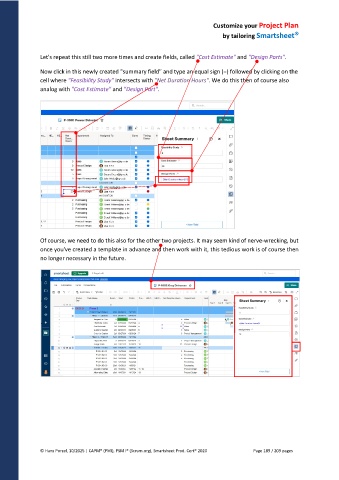
Let's repeat this still two more times and create fields, called "Cost Estimate" and "Design Parts".
Now click in this newly created "summary field" and type an equal sign (=) followed by clicking on the
cell where "Feasibility Study" intersects with "Net Duration Hours". We do this then of course also
analog with "Cost Estimate" and "Design Part".
Of course, we need to do this also for the other two projects. It may seem kind of nerve-wrecking, but
once you've created a template in advance and then work with it, this tedious work is of course then
no longer necessary in the future.
© Hans Porzel, 10/2025 | CAPM® (PMI), PSM I® (Scrum.org), Smartsheet Prod. Cert® 2020 Page 189 / 209 pages

