


Page 203 - Customize-Project-Plan-by-tailoring-Smartsheet
P. 203
Customize your Project Plan
by tailoring Smartsheet
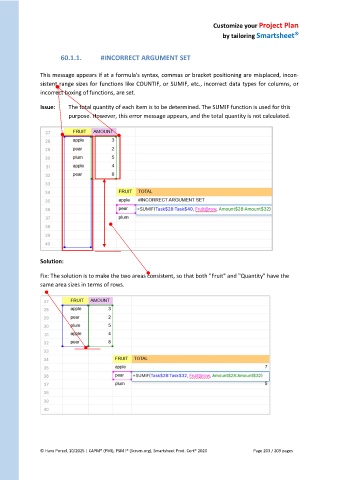
60.1.1. #INCORRECT ARGUMENT SET
This message appears if at a formula's syntax, commas or bracket positioning are misplaced, incon-
sistent range sizes for functions like COUNTIF, or SUMIF, etc., incorrect data types for columns, or
incorrect boxing of functions, are set.
Issue: The total quantity of each item is to be determined. The SUMIF function is used for this
purpose. However, this error message appears, and the total quantity is not calculated.
Solution:
Fix: The solution is to make the two areas consistent, so that both "Fruit" and "Quantity" have the
same area sizes in terms of rows.
© Hans Porzel, 10/2025 | CAPM® (PMI), PSM I® (Scrum.org), Smartsheet Prod. Cert® 2020 Page 203 / 209 pages

