


Page 205 - Customize-Project-Plan-by-tailoring-Smartsheet
P. 205
Customize your Project Plan
by tailoring Smartsheet
60.1.3. #INVALID DATA TYPE
The formula references to an incompatible data type.
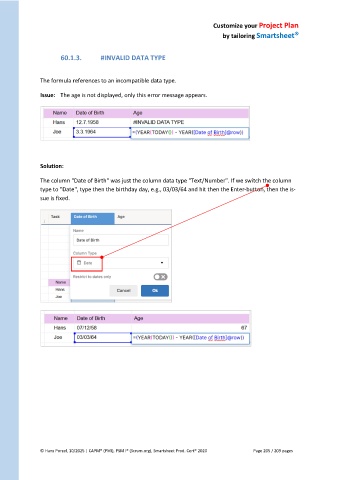
Issue: The age is not displayed, only this error message appears.
Solution:
The column "Date of Birth" was just the column data type "Text/Number". If we switch the column
type to "Date", type then the birthday day, e.g., 03/03/64 and hit then the Enter-button, then the is-
sue is fixed.
© Hans Porzel, 10/2025 | CAPM® (PMI), PSM I® (Scrum.org), Smartsheet Prod. Cert® 2020 Page 205 / 209 pages

