


Page 206 - Customize-Project-Plan-by-tailoring-Smartsheet
P. 206
Customize your Project Plan
by tailoring Smartsheet
60.1.4. #NO MATCH
This message means, that there was not found a matching entry at the data area when it got looked
up with a matrix function, like for instance the function VLOOKUP.
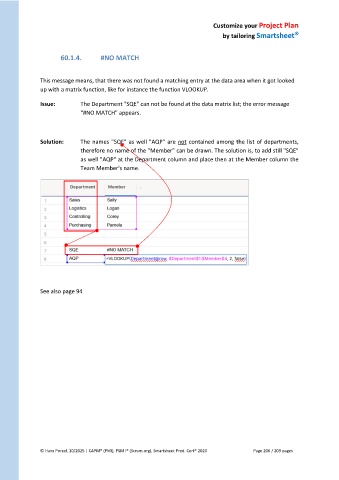
Issue: The Department "SQE" can not be found at the data matrix list; the error message
"#NO MATCH" appears.
Solution: The names "SQE" as well "AQP" are not contained among the list of departments,
therefore no name of the "Member" can be drawn. The solution is, to add still "SQE"
as well "AQP" at the Department column and place then at the Member column the
Team Member's name.
See also page 94
© Hans Porzel, 10/2025 | CAPM® (PMI), PSM I® (Scrum.org), Smartsheet Prod. Cert® 2020 Page 206 / 209 pages

