


Page 42 - Customize-Project-Plan-by-tailoring-Smartsheet
P. 42
Customize your Project Plan
by tailoring Smartsheet
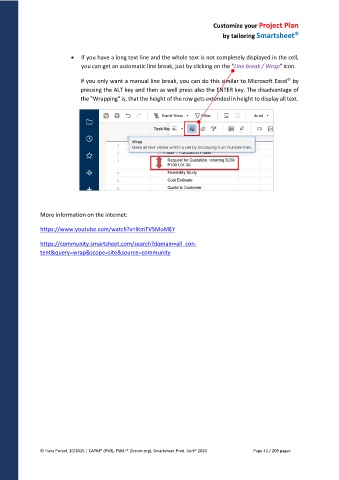
If you have a long text line and the whole text is not completely displayed in the cell,
you can get an automatic line break, just by clicking on the "Line break / Wrap" icon.
If you only want a manual line break, you can do this similar to Microsoft Excel by
pressing the ALT key and then as well press also the ENTER key. The disadvantage of
the "Wrapping" is, that the height of the row gets extended in height to display all text.
More information on the internet:
https://www.youtube.com/watch?v=lKmTV5MoMEY
https://community.smartsheet.com/search?domain=all_con-
tent&query=wrap&scope=site&source=community
© Hans Porzel, 10/2025 | CAPM® (PMI), PSM I® (Scrum.org), Smartsheet Prod. Cert® 2020 Page 42 / 209 pages

