


Page 28 - Customize-Project-Plan-by-tailoring-Smartsheet
P. 28
Customize your Project Plan
by tailoring Smartsheet
8.1.4. After Log-in (Sign-in)
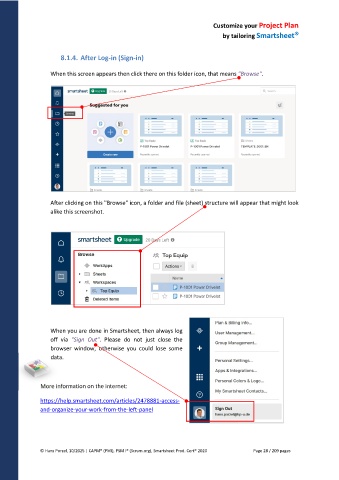
When this screen appears then click there on this folder icon, that means "Browse".
After clicking on this "Browse" icon, a folder and file (sheet) structure will appear that might look
alike this screenshot.
When you are done in Smartsheet, then always log
off via "Sign Out". Please do not just close the
browser window, otherwise you could lose some
data.
More information on the internet:
https://help.smartsheet.com/articles/2478881-access-
and-organize-your-work-from-the-left-panel
© Hans Porzel, 10/2025 | CAPM® (PMI), PSM I® (Scrum.org), Smartsheet Prod. Cert® 2020 Page 28 / 209 pages

