


Page 35 - Customize-Project-Plan-by-tailoring-Smartsheet
P. 35
Customize your Project Plan
by tailoring Smartsheet
12. Create Sheet (Project) and Work-Breakdown Structure (WBS)
12.1. Create Sheet (Project)
Usually, you create a template just once, then, after released, it gets used for future projects.
After you have then done some projects deriving from this template, it's time to revise and
adjust the initial template. This belongs then into the frame, called "Learning Organization /
Lesson's Learned".
But since we haven't created such a template yet, respectively we are just going to create it in
the course of this book, let's use the basic (blank) template that Smartsheet provides for hand-
ling projects. This Smartsheet project template will be then expanded and gradually further
developed.
CASE STUDY
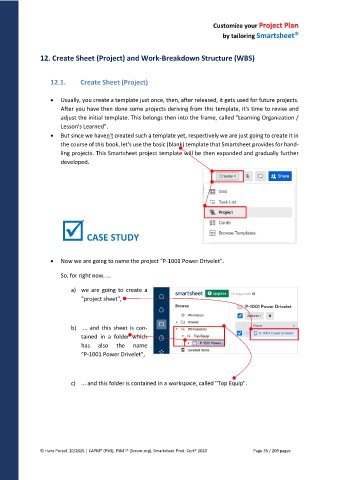
Now we are going to name the project "P-1001 Power Drivelet".
So, for right now, ...
a) we are going to create a
"project sheet",
b) ... and this sheet is con-
tained in a folder which
has also the name
"P-1001 Power Drivelet",
c) ... and this folder is contained in a workspace, called "Top Equip".
© Hans Porzel, 10/2025 | CAPM® (PMI), PSM I® (Scrum.org), Smartsheet Prod. Cert® 2020 Page 35 / 209 pages

