


Page 104 - Customize-Project-Plan-by-tailoring-Smartsheet
P. 104
Customize your Project Plan
by tailoring Smartsheet
Then insert this formula there at "Timing Status":
=IF(Done@row = 1, "Blue", IF(Finish@row < TODAY(), "Red", IF(TODAY() - Finish@row >
-3, "Yellow", IF(Finish@row > TODAY(), "Green"))))
You might get the error message "#UNPARSEABLE" . "Unpar-
seable" means "unreadable". The cause is that there might be unwanted spaces / blanks
or wrong spellings in the formula, either. Probably also commas or semicolons or the cor-
rect straight quotation marks may be not set correct there. If you remove or fix these mis-
takes, Smartsheet should accept the formula and a symbol should appear as desired.
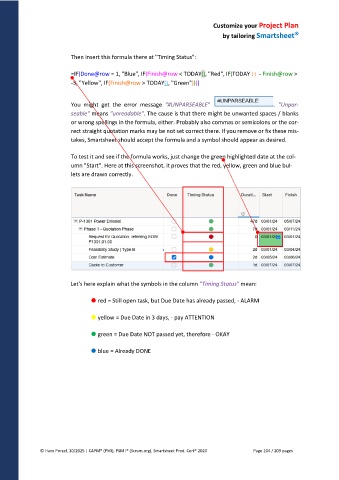
To test it and see if the formula works, just change the green highlighted date at the col-
umn "Start". Here at this screenshot, it proves that the red, yellow, green and blue bul-
lets are drawn correctly.
Let's here explain what the symbols in the column "Timing Status" mean:
red = Still open task, but Due Date has already passed, - ALARM
yellow = Due Date in 3 days, - pay ATTENTION
green = Due Date NOT passed yet, therefore - OKAY
blue = Already DONE
© Hans Porzel, 10/2025 | CAPM® (PMI), PSM I® (Scrum.org), Smartsheet Prod. Cert® 2020 Page 104 / 209 pages

