


Page 89 - Customize-Project-Plan-by-tailoring-Smartsheet
P. 89
Customize your Project Plan
by tailoring Smartsheet
Our 2nd goal is then:
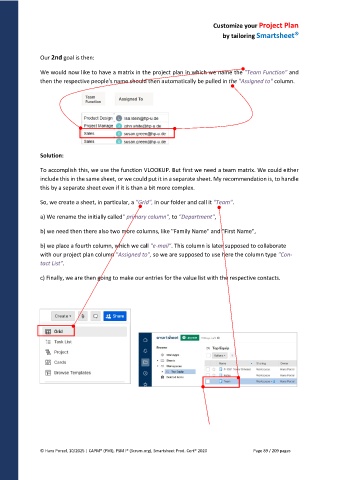
We would now like to have a matrix in the project plan in which we name the "Team Function" and
then the respective people's name should then automatically be pulled in the "Assigned to" column.
Solution:
To accomplish this, we use the function VLOOKUP. But first we need a team matrix. We could either
include this in the same sheet, or we could put it in a separate sheet. My recommendation is, to handle
this by a separate sheet even if it is than a bit more complex.
So, we create a sheet, in particular, a "Grid", in our folder and call it "Team".
a) We rename the initially called" primary column", to "Department",
b) we need then there also two more columns, like "Family Name" and "First Name",
b) we place a fourth column, which we call "e-mail". This column is later supposed to collaborate
with our project plan column "Assigned to", so we are supposed to use here the column type "Con-
tact List".
c) Finally, we are then going to make our entries for the value list with the respective contacts.
© Hans Porzel, 10/2025 | CAPM® (PMI), PSM I® (Scrum.org), Smartsheet Prod. Cert® 2020 Page 89 / 209 pages

