


Page 113 - Customize-Project-Plan-by-tailoring-Smartsheet
P. 113
Customize your Project Plan
by tailoring Smartsheet
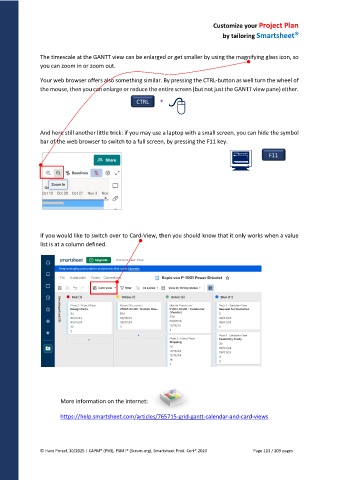
The timescale at the GANTT view can be enlarged or get smaller by using the magnifying glass icon, so
you can zoom in or zoom out.
Your web browser offers also something similar. By pressing the CTRL-button as well turn the wheel of
the mouse, then you can enlarge or reduce the entire screen (but not just the GANTT view pane) either.
CTRL +
And here still another little trick: if you may use a laptop with a small screen, you can hide the symbol
bar of the web browser to switch to a full screen, by pressing the F11 key.
F11
If you would like to switch over to Card-View, then you should know that it only works when a value
list is at a column defined.
More information on the internet:
https://help.smartsheet.com/articles/765715-grid-gantt-calendar-and-card-views
© Hans Porzel, 10/2025 | CAPM® (PMI), PSM I® (Scrum.org), Smartsheet Prod. Cert® 2020 Page 113 / 209 pages

