


Page 118 - Customize-Project-Plan-by-tailoring-Smartsheet
P. 118
Customize your Project Plan
by tailoring Smartsheet
42. Export / Import
42.1. Export / Import
Concerning the articles that I provided above about saving and refreshing sheets and as well about
data safety: There I stated already that even if you save a copy of your sheets, but all your data are just
saved on the Smartsheet server in the Cloud. Hence, you don't have a real backup version on your own
property.
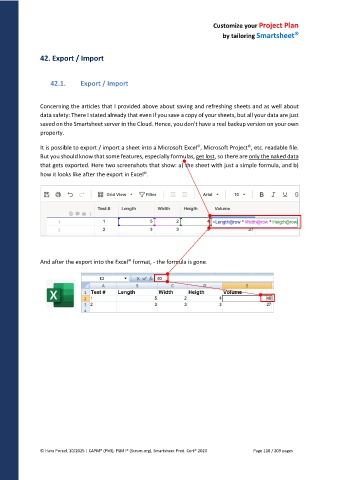
It is possible to export / import a sheet into a Microsoft Excel , Microsoft Project , etc. readable file.
But you should know that some features, especially formulas, get lost, so there are only the naked data
that gets exported. Here two screenshots that show: a) the sheet with just a simple formula, and b)
how it looks like after the export in Excel .
And after the export into the Excel format, - the formula is gone.
© Hans Porzel, 10/2025 | CAPM® (PMI), PSM I® (Scrum.org), Smartsheet Prod. Cert® 2020 Page 118 / 209 pages

