


Page 115 - Customize-Project-Plan-by-tailoring-Smartsheet
P. 115
Customize your Project Plan
by tailoring Smartsheet
41. Save, Save as … (Backup)
41.1. Save, Save as … (Backup)
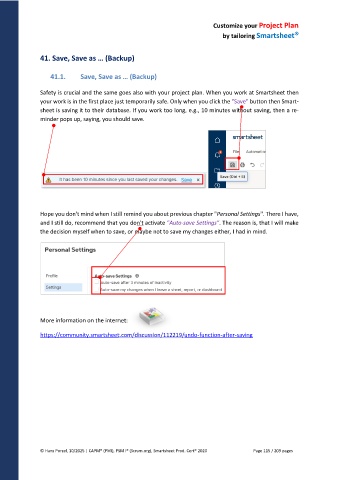
Safety is crucial and the same goes also with your project plan. When you work at Smartsheet then
your work is in the first place just temporarily safe. Only when you click the "Save" button then Smart-
sheet is saving it to their database. If you work too long, e.g., 10 minutes without saving, then a re-
minder pops up, saying, you should save.
Hope you don't mind when I still remind you about previous chapter "Personal Settings". There I have,
and I still do, recommend that you don't activate "Auto-save Settings". The reason is, that I will make
the decision myself when to save, or maybe not to save my changes either, I had in mind.
More information on the internet:
https://community.smartsheet.com/discussion/112219/undo-function-after-saving
© Hans Porzel, 10/2025 | CAPM® (PMI), PSM I® (Scrum.org), Smartsheet Prod. Cert® 2020 Page 115 / 209 pages

