


Page 131 - Customize-Project-Plan-by-tailoring-Smartsheet
P. 131
Customize your Project Plan
by tailoring Smartsheet
48. Filters
48.1. Filters
48.1.1. Quick Filter
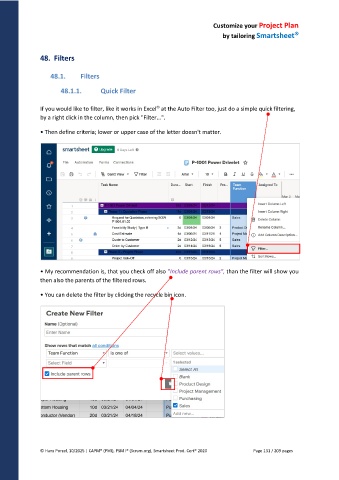
If you would like to filter, like it works in Excel at the Auto Filter too, just do a simple quick filtering,
by a right click in the column, then pick "Filter...".
• Then define criteria; lower or upper case of the letter doesn't matter.
• My recommendation is, that you check off also "Include parent rows", than the filter will show you
then also the parents of the filtered rows.
• You can delete the filter by clicking the recycle bin icon.
© Hans Porzel, 10/2025 | CAPM® (PMI), PSM I® (Scrum.org), Smartsheet Prod. Cert® 2020 Page 131 / 209 pages

