


Page 71 - Customize-Project-Plan-by-tailoring-Smartsheet
P. 71
Customize your Project Plan
by tailoring Smartsheet
In fact, we'd be done by now. But we want to bring in some more comfort and create still an-
other rule. In this case, we now want to achieve that the entire row gets colored green if the
slack time is greater than zero.
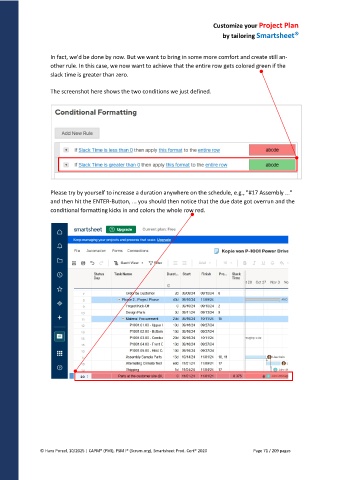
The screenshot here shows the two conditions we just defined.
Please try by yourself to increase a duration anywhere on the schedule, e.g., "#17 Assembly ..."
and then hit the ENTER-Button, ... you should then notice that the due date got overrun and the
conditional formatting kicks in and colors the whole row red.
© Hans Porzel, 10/2025 | CAPM® (PMI), PSM I® (Scrum.org), Smartsheet Prod. Cert® 2020 Page 71 / 209 pages

