


Page 66 - Customize-Project-Plan-by-tailoring-Smartsheet
P. 66
Customize your Project Plan
by tailoring Smartsheet
CASE STUDY
Now we come to the most important part of our case study, where we will make sure that the due
date will not be missed.
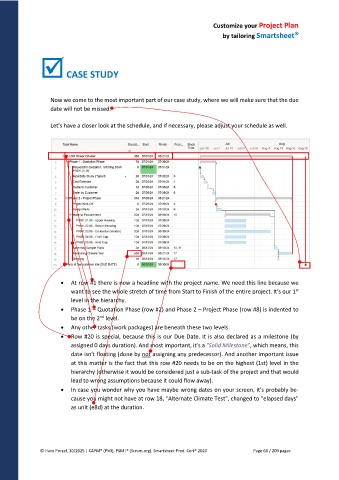
Let's have a closer look at the schedule, and if necessary, please adjust your schedule as well.
At row #1 there is now a headline with the project name. We need this line because we
want to see the whole stretch of time from Start to Finish of the entire project. It's our 1 st
level in the hierarchy.
Phase 1 – Quotation Phase (row #2) and Phase 2 – Project Phase (row #8) is indented to
nd
be on the 2 level.
Any other tasks (work packages) are beneath these two levels.
Row #20 is special, because this is our Due Date. It is also declared as a milestone (by
assigned 0 days duration). And most important, it's a "Solid Milestone", which means, this
date isn't floating (done by not assigning any predecessor). And another important issue
at this matter is the fact that this row #20 needs to be on the highest (1st) level in the
hierarchy (otherwise it would be considered just a sub-task of the project and that would
lead to wrong assumptions because it could flow away).
In case you wonder why you have maybe wrong dates on your screen, it's probably be-
cause you might not have at row 18, "Alternate Climate Test", changed to "elapsed days"
as unit (e8d) at the duration.
© Hans Porzel, 10/2025 | CAPM® (PMI), PSM I® (Scrum.org), Smartsheet Prod. Cert® 2020 Page 66 / 209 pages

