


Page 140 - Customize-Project-Plan-by-tailoring-Smartsheet
P. 140
Customize your Project Plan
by tailoring Smartsheet
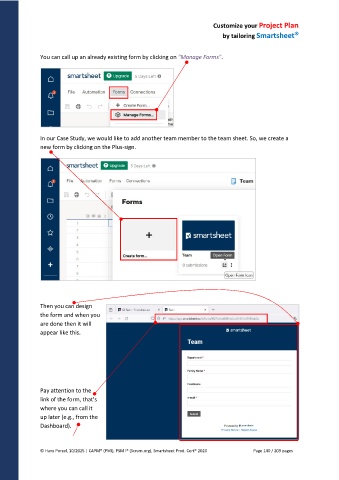
You can call up an already existing form by clicking on "Manage Forms".
In our Case Study, we would like to add another team member to the team sheet. So, we create a
new form by clicking on the Plus-sign.
Then you can design
the form and when you
are done then it will
appear like this.
Pay attention to the
link of the form, that's
where you can call it
up later (e.g., from the
Dashboard).
© Hans Porzel, 10/2025 | CAPM® (PMI), PSM I® (Scrum.org), Smartsheet Prod. Cert® 2020 Page 140 / 209 pages

