


Page 141 - Customize-Project-Plan-by-tailoring-Smartsheet
P. 141
Customize your Project Plan
by tailoring Smartsheet
https://app.smartsheet.eu/b/form/9f27d0ab609f4a2ca94921df1986de3a
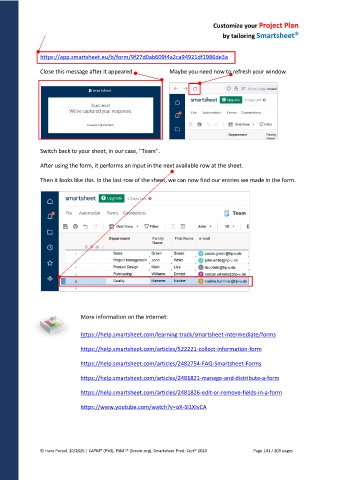
Close this message after it appeared. Maybe you need now to refresh your window.
Switch back to your sheet, in our case, "Team".
After using the form, it performs an input in the next available row at the sheet.
Then it looks like this. In the last row of the sheet, we can now find our entries we made in the form.
More information on the internet:
https://help.smartsheet.com/learning-track/smartsheet-intermediate/forms
https://help.smartsheet.com/articles/522221-collect-information-form
https://help.smartsheet.com/articles/2482754-FAQ-Smartsheet-Forms
https://help.smartsheet.com/articles/2481821-manage-and-distribute-a-form
https://help.smartsheet.com/articles/2481826-edit-or-remove-fields-in-a-form
https://www.youtube.com/watch?v=oX-Sl1XIvCA
© Hans Porzel, 10/2025 | CAPM® (PMI), PSM I® (Scrum.org), Smartsheet Prod. Cert® 2020 Page 141 / 209 pages

