


Page 153 - Customize-Project-Plan-by-tailoring-Smartsheet
P. 153
Customize your Project Plan
by tailoring Smartsheet
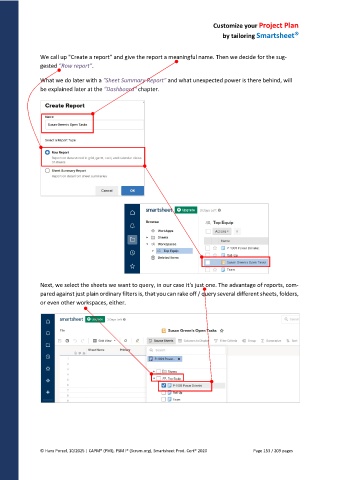
We call up "Create a report" and give the report a meaningful name. Then we decide for the sug-
gested "Row report".
What we do later with a "Sheet Summary Report" and what unexpected power is there behind, will
be explained later at the "Dashboard" chapter.
Next, we select the sheets we want to query, in our case it's just one. The advantage of reports, com-
pared against just plain ordinary filters is, that you can rake off / query several different sheets, folders,
or even other workspaces, either.
© Hans Porzel, 10/2025 | CAPM® (PMI), PSM I® (Scrum.org), Smartsheet Prod. Cert® 2020 Page 153 / 209 pages

