


Page 157 - Customize-Project-Plan-by-tailoring-Smartsheet
P. 157
Customize your Project Plan
by tailoring Smartsheet
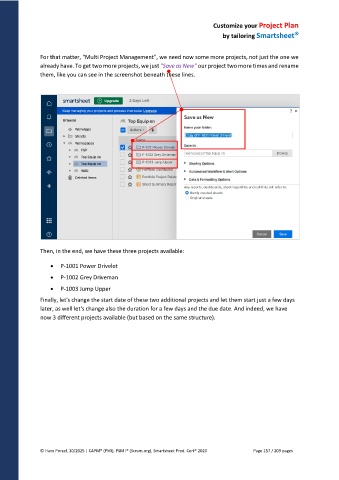
For that matter, "Multi Project Management", we need now some more projects, not just the one we
already have. To get two more projects, we just "Save as New" our project two more times and rename
them, like you can see in the screenshot beneath these lines.
Then, in the end, we have these three projects available:
P-1001 Power Drivelet
P-1002 Grey Driveman
P-1003 Jump Upper
Finally, let's change the start date of these two additional projects and let them start just a few days
later, as well let's change also the duration for a few days and the due date. And indeed, we have
now 3 different projects available (but based on the same structure).
© Hans Porzel, 10/2025 | CAPM® (PMI), PSM I® (Scrum.org), Smartsheet Prod. Cert® 2020 Page 157 / 209 pages

