


Page 51 - Customize-Project-Plan-by-tailoring-Smartsheet
P. 51
Customize your Project Plan
by tailoring Smartsheet
CASE STUDY
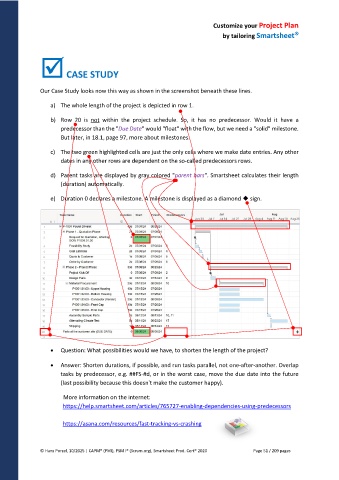
Our Case Study looks now this way as shown in the screenshot beneath these lines.
a) The whole length of the project is depicted in row 1.
b) Row 20 is not within the project schedule. So, it has no predecessor. Would it have a
predecessor than the "Due Date" would "float" with the flow, but we need a "solid" milestone.
But later, in 18.1, page 97, more about milestones.
c) The two green highlighted cells are just the only cells where we make date entries. Any other
dates in any other rows are dependent on the so-called predecessors rows.
d) Parent tasks are displayed by gray colored "parent bars". Smartsheet calculates their length
(duration) automatically.
e) Duration 0 declares a milestone. A milestone is displayed as a diamond sign.
Question: What possibilities would we have, to shorten the length of the project?
Answer: Shorten durations, if possible, and run tasks parallel, not one-after-another. Overlap
tasks by predecessor, e.g. ##FS-#d, or in the worst case, move the due date into the future
(last possibility because this doesn't make the customer happy).
More information on the internet:
https://help.smartsheet.com/articles/765727-enabling-dependencies-using-predecessors
https://asana.com/resources/fast-tracking-vs-crashing
© Hans Porzel, 10/2025 | CAPM® (PMI), PSM I® (Scrum.org), Smartsheet Prod. Cert® 2020 Page 51 / 209 pages

