


Page 54 - Customize-Project-Plan-by-tailoring-Smartsheet
P. 54
Customize your Project Plan
by tailoring Smartsheet
Next question: How do we define a "Solid Milestone"?
Answer:
a) We assign the task a duration of zero (0) days,
b) and enter the date directly in the column "Start". Because Duration is 0 days, Smart-
sheet also writes in the column "Finish" then the same date as at "Start".
c) A "Solid Milestone" has no predecessor that refers to a task in the schedule. To accom-
plish this, keep the cell at the predecessor column empty.
Let's continue …
Do we want to set another milestone?
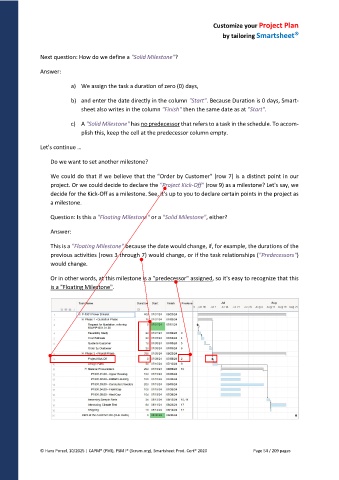
We could do that if we believe that the "Order by Customer" (row 7) is a distinct point in our
project. Or we could decide to declare the "Project Kick-Off" (row 9) as a milestone? Let's say, we
decide for the Kick-Off as a milestone. See, it's up to you to declare certain points in the project as
a milestone.
Question: Is this a "Floating Milestone" or a "Solid Milestone", either?
Answer:
This is a "Floating Milestone" because the date would change, if, for example, the durations of the
previous activities (rows 3 through 7) would change, or if the task relationships ("Predecessors")
would change.
Or in other words, at this milestone is a "predecessor" assigned, so it's easy to recognize that this
is a "Floating Milestone".
© Hans Porzel, 10/2025 | CAPM® (PMI), PSM I® (Scrum.org), Smartsheet Prod. Cert® 2020 Page 54 / 209 pages

