


Page 78 - Customize-Project-Plan-by-tailoring-Smartsheet
P. 78
Customize your Project Plan
by tailoring Smartsheet
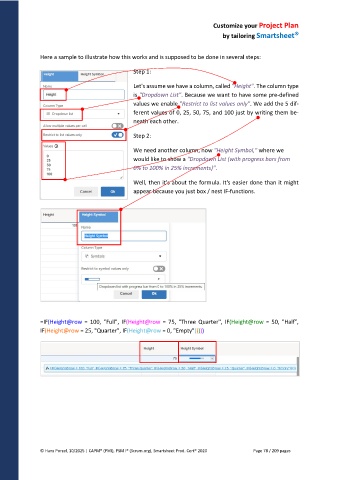
Here a sample to illustrate how this works and is supposed to be done in several steps:
Step 1:
Let's assume we have a column, called "Height". The column type
is "Dropdown List". Because we want to have some pre-defined
values we enable "Restrict to list values only". We add the 5 dif-
ferent values of 0, 25, 50, 75, and 100 just by writing them be-
neath each other.
Step 2:
We need another column, now "Height Symbol," where we
would like to show a "Dropdown List (with progress bars from
0% to 100% in 25% increments)".
Well, then it's about the formula. It's easier done than it might
appear because you just box / nest IF-functions.
=IF(Height@row = 100, "Full", IF(Height@row = 75, "Three Quarter", IF(Height@row = 50, "Half",
IF(Height@row = 25, "Quarter", IF(Height@row = 0, "Empty")))))
© Hans Porzel, 10/2025 | CAPM® (PMI), PSM I® (Scrum.org), Smartsheet Prod. Cert® 2020 Page 78 / 209 pages

