


Page 58 - Customize-Project-Plan-by-tailoring-Smartsheet
P. 58
Customize your Project Plan
by tailoring Smartsheet
CASE STUDY
In our case study, we want feedback from each team member about
how much time (net duration / work effort) they actually used to
complete their task.
The purpose of this action is, that we want to use these data to col-
lect better basic information for future projects.
Later we will see how we can use reports to process these figures
from this project as well as from several other projects (multi-pro-
ject management) in a purposeful way.
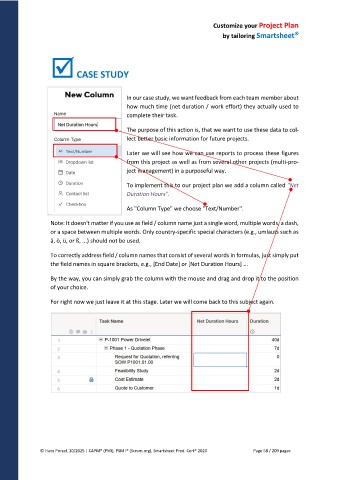
To implement this to our project plan we add a column called "Net
Duration Hours".
As "Column Type" we choose "Text/Number".
Note: It doesn't matter if you use as field / column name just a single word, multiple words, a dash,
or a space between multiple words. Only country-specific special characters (e.g., umlauts such as
ä, ö, ü, or ß, ...) should not be used.
To correctly address field / column names that consist of several words in formulas, just simply put
the field names in square brackets, e.g., [End Date] or [Net Duration Hours] ...
By the way, you can simply grab the column with the mouse and drag and drop it to the position
of your choice.
For right now we just leave it at this stage. Later we will come back to this subject again.
© Hans Porzel, 10/2025 | CAPM® (PMI), PSM I® (Scrum.org), Smartsheet Prod. Cert® 2020 Page 58 / 209 pages

