Page 164 - Customize-Project-Plan-by-tailoring-Smartsheet
P. 164
Customize your Project Plan
                                                                                                            
                                                                               by tailoring Smartsheet


               To gain a better view, just move the already existing column "Done" right next to the "Task Name"
               column.


                                                               Q: Now let us first ponder about how we can
                                                               draw the status of the project?

                                                               A: We can manage this all with IF-functions; we
                                                               just need to box / nest them.


                                                               Remember that in the column "Done" we have
                                                               set up a formula at the parent rows. There the
                                                               parent  is  automatically  through  Smartsheet
                                                               checked  off  if  all  children  tasks  beneath  are
                                                               checked off. You still remember? (Chapter 36.1,
                                                               page 205)


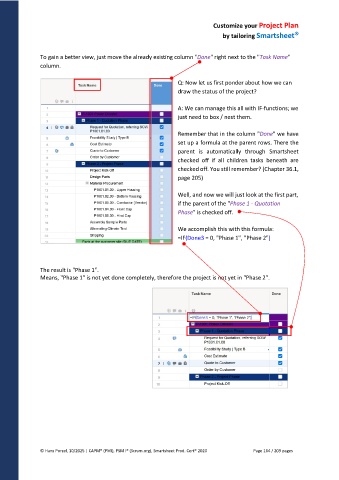
                                                               Well, and now we will just look at the first part,
                                                               if the parent of the "Phase 1 - Quotation
                                                               Phase" is checked off.


                                                               We accomplish this with this formula:
                                                               =IF(Done3 = 0, "Phase 1", "Phase 2")


               The result is "Phase 1".
               Means, "Phase 1" is not yet done completely, therefore the project is not yet in "Phase 2".


               © Hans Porzel, 10/2025 | CAPM® (PMI), PSM I® (Scrum.org), Smartsheet Prod. Cert® 2020                                             Page 164 / 209 pages
   159   160   161   162   163   164   165   166   167   168   169