


Page 167 - Customize-Project-Plan-by-tailoring-Smartsheet
P. 167
Customize your Project Plan
by tailoring Smartsheet
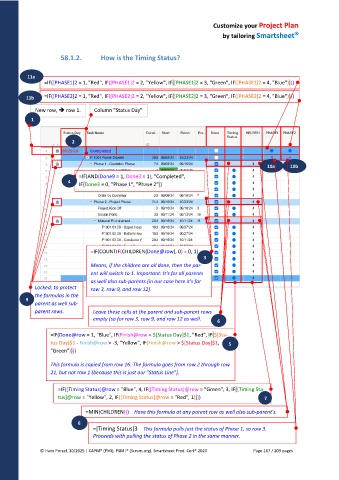
58.1.2. How is the Timing Status?
11a .
=IF([PHASE1]2 = 1, "Red", IF([PHASE1]2 = 2, "Yellow", IF([PHASE1]2 = 3, "Green", IF([PHASE1]2 = 4, "Blue"))))
11b =IF([PHASE2]2 = 1, "Red", IF([PHASE2]2 = 2, "Yellow", IF([PHASE2]2 = 3, "Green", IF([PHASE2]2 = 4, "Blue"))))
New row, row 1. Column "Status Day"
1
2
10a 10b
=IF(AND(Done9 = 1, Done3 = 1), "Completed",
4
IF(Done3 = 0, "Phase 1", "Phase 2"))
=IF(COUNTIF(CHILDREN(Done@row), 0) = 0, 1)
3
Means, if the children are all done, then the par-
ent will switch to 1. Important: It's for all parents
as well also sub-parents (in our case here it's for
Locked; to protect row 3, row 9, and row 12).
the formulas in the
9
parent as well sub-
parent rows. Leave these cells at the parent and sub-parent rows
empty (so for row 3, row 9, and row 12 as well.
6
=IF(Done@row = 1, "Blue", IF(Finish@row < $[Status Day]$1, "Red", IF($[Sta-
tus Day]$1 - Finish@row > -3, "Yellow", IF(Finish@row > $[Status Day]$1, 5
"Green"))))
This formula is copied from row 16. The formula goes from row 2 through row
21, but not row 1 (because this is just our "Status Line").
=IF([Timing Status]@row = "Blue", 4, IF([Timing Status]@row = "Green", 3, IF([Timing Sta-
tus]@row = "Yellow", 2, IF([Timing Status]@row = "Red", 1)))) 7
=MIN(CHILDREN()) Have this formula at any parent row as well also sub-parent's.
8
=[Timing Status]3 This formula pulls just the status of Phase 1, so row 3.
Proceeds with pulling the status of Phase 2 in the same manner.
© Hans Porzel, 10/2025 | CAPM® (PMI), PSM I® (Scrum.org), Smartsheet Prod. Cert® 2020 Page 167 / 209 pages

