


Page 168 - Customize-Project-Plan-by-tailoring-Smartsheet
P. 168
Customize your Project Plan
by tailoring Smartsheet
Let me describe here again in a nutshell what happened a page further up:
st
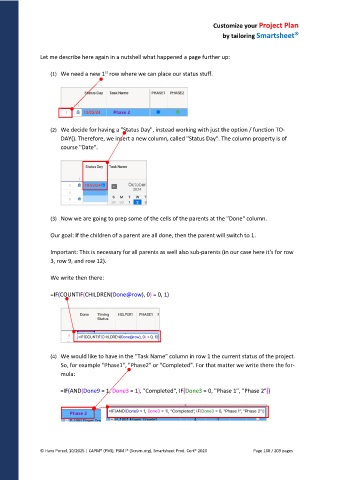
(1) We need a new 1 row where we can place our status stuff.
(2) We decide for having a "Status Day", instead working with just the option / function TO-
DAY(). Therefore, we insert a new column, called "Status Day". The column property is of
course "Date".
(3) Now we are going to prep some of the cells of the parents at the "Done" column.
Our goal: If the children of a parent are all done, then the parent will switch to 1.
Important: This is necessary for all parents as well also sub-parents (in our case here it's for row
3, row 9, and row 12).
We write then there:
=IF(COUNTIF(CHILDREN(Done@row), 0) = 0, 1)
(4) We would like to have in the "Task Name" column in row 1 the current status of the project.
So, for example "Phase1", "Phase2" or "Completed". For that matter we write there the for-
mula:
=IF(AND(Done9 = 1, Done3 = 1), "Completed", IF(Done3 = 0, "Phase 1", "Phase 2"))
© Hans Porzel, 10/2025 | CAPM® (PMI), PSM I® (Scrum.org), Smartsheet Prod. Cert® 2020 Page 168 / 209 pages

