


Page 171 - Customize-Project-Plan-by-tailoring-Smartsheet
P. 171
Customize your Project Plan
by tailoring Smartsheet
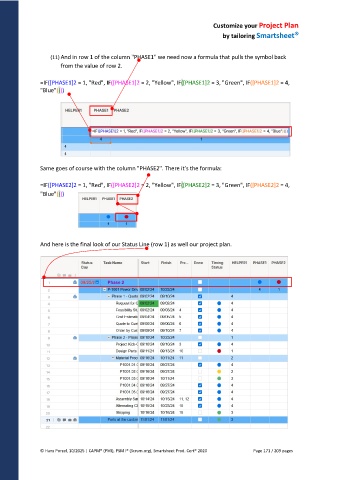
(11) And in row 1 of the column "PHASE1" we need now a formula that pulls the symbol back
from the value of row 2.
=IF([PHASE1]2 = 1, "Red", IF([PHASE1]2 = 2, "Yellow", IF([PHASE1]2 = 3, "Green", IF([PHASE1]2 = 4,
"Blue"))))
Same goes of course with the column "PHASE2". There it's the formula:
=IF([PHASE2]2 = 1, "Red", IF([PHASE2]2 = 2, "Yellow", IF([PHASE2]2 = 3, "Green", IF([PHASE2]2 = 4,
"Blue"))))
And here is the final look of our Status Line (row 1) as well our project plan.
© Hans Porzel, 10/2025 | CAPM® (PMI), PSM I® (Scrum.org), Smartsheet Prod. Cert® 2020 Page 171 / 209 pages

