


Page 170 - Customize-Project-Plan-by-tailoring-Smartsheet
P. 170
Customize your Project Plan
by tailoring Smartsheet
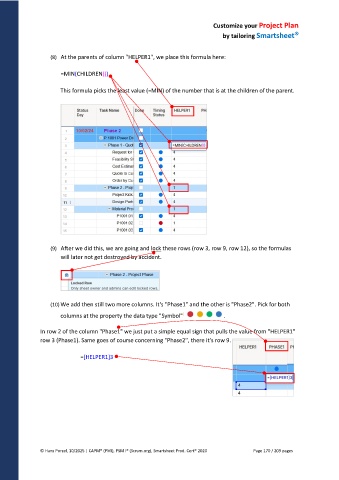
(8) At the parents of column "HELPER1", we place this formula here:
=MIN(CHILDREN())
This formula picks the least value (=MIN) of the number that is at the children of the parent.
(9) After we did this, we are going and lock these rows (row 3, row 9, row 12), so the formulas
will later not get destroyed by accident.
(10) We add then still two more columns. It's "Phase1" and the other is "Phase2". Pick for both
columns at the property the data type "Symbol" .
In row 2 of the column "Phase1" we just put a simple equal sign that pulls the value from "HELPER1"
row 3 (Phase1). Same goes of course concerning "Phase2", there it's row 9.
=[HELPER1]3
© Hans Porzel, 10/2025 | CAPM® (PMI), PSM I® (Scrum.org), Smartsheet Prod. Cert® 2020 Page 170 / 209 pages

